Google Ads Not Getting Impressions? Fix It in 10 Minutes

73 percent of Google Ads impression drops in 2026 come from bid strategy conflicts, not campaign errors. You did not set something up wrong. The algorithm is refusing to bid into auctions because a single setting is telling it not to. Most of these issues are fixable in under 10 minutes once you know where to look.
This guide covers all 12 reasons your Google Ads are not getting impressions, in order from most common to most overlooked. Use the quick reference table below to find your specific situation and jump straight to the fix.
Before anything else: do not search for your own ad on Google to test whether it is showing. Searching without clicking hurts your CTR signals and can cause Google to stop showing your ad to you personally. Use the Ad Preview and Diagnosis Tool inside Google Ads instead.
12 reasons why Google Ads are not getting impressions at a glance
| Reason | Why it happens | Quick fix |
|---|---|---|
| Ad still in review | New or edited ads take 24 to 48 hours to be approved | Wait 24 to 48 hours. Check Status column in Ads and Assets. |
| Budget too low | Daily budget cannot compete in the auction at current CPMs | Set budget at 5x your target CPC minimum. Consolidate campaigns. |
| Low search volume keywords | Keywords searched so rarely that Google pauses them automatically | Check keyword status. Switch to broader phrase match variations. |
| Quality Score too low | Ad relevance or landing page score below competitive threshold | Align headline with keyword. Fix landing page to match ad promise. |
| Targeting too narrow | Location, schedule, or audience layers too restrictive | Start broad, narrow based on data. Remove stacked audience filters. |
| Negative keywords blocking ads | Negative keywords accidentally excluding relevant searches | Audit negative keyword lists at campaign and ad group level. |
| Billing or payment failure | Failed payment or account spending limit reached | Check Billing and Payments. Resolve payment issues to restart. |
| tCPA or tROAS set too aggressively | Target CPA or ROAS makes algorithm refuse to bid into auctions | Set tCPA 2x to 3x your actual CPA. Switch to Maximize Conversions first. |
| Ad disapproved silently | Ads flagged gradually over 3 to 4 days, stopping spend quietly | Check Account Quality page. Look for limited or disapproved status. |
| Performance Max delivery issue | PMax conflicts with Search campaigns or asset groups are thin | Check Asset Group status. Ensure search themes are added for PMax. |
| Ad schedule timezone error | Ad schedule set in wrong timezone, showing 0 hours of eligibility | Go to Ad Schedule settings and verify timezone matches your market. |
| Date range error in dashboard | Viewing a date range before campaign launched shows zero data | Change date range in dashboard to include actual campaign live dates. |
How to diagnose why your Google Ads are not getting impressions
Work through this diagnostic flow before diving into individual reasons. It narrows the problem to one category in under two minutes.
- Check the date range in your dashboard first. Confirm you are viewing a period when the campaign was actually live.
- Go to Campaigns and check the Status column. Are the campaign, ad set, and ad all showing green Active status?
- Go to Keywords and add the Search Impr. Share, Lost IS Budget, and Lost IS Rank columns. These tell you whether impressions are lost to budget or to ad quality.
- Go to Ads and Assets and check the Status column for each ad. Look for Under Review, Disapproved, or Limited.
- Check Billing and Payments for any failed payment notifications or account spending limit warnings.
Reason 1: Your ad is still in review
Every new ad and every edited ad goes through Google's review process before it can show. Most ads are reviewed within 24 hours. New accounts and ads in sensitive categories like health, finance, or legal can take up to five business days.
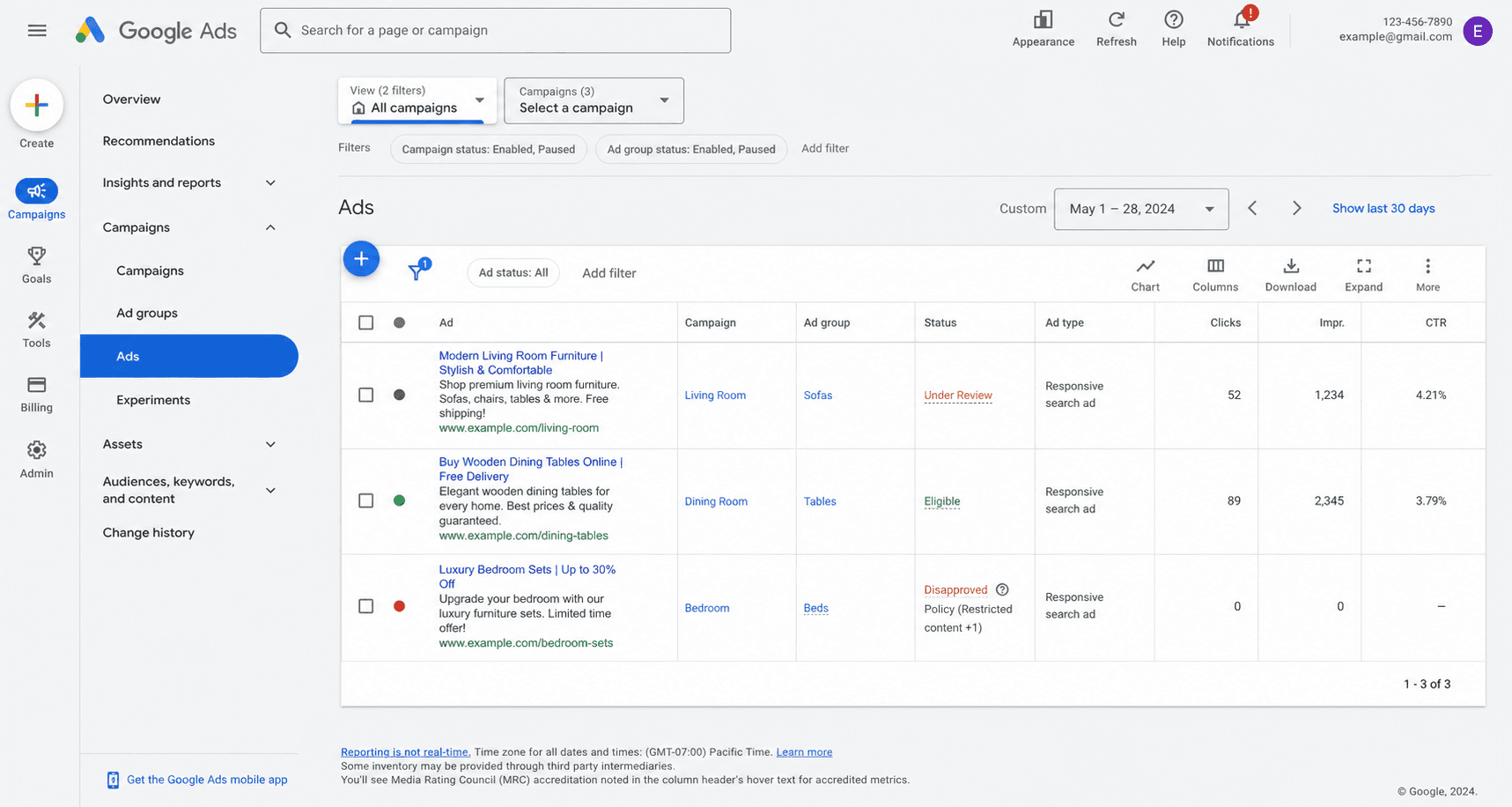
Check the Status column inside Ads and Assets to identify which state each ad is in. Under Review means approval is pending — wait 24 to 48 hours before taking any action. Eligible means the ad is approved and something else is blocking impressions, so move to the next reason. Disapproved means the ad was rejected — click the reason, fix the flagged issue, and click Request Review. Do not edit the ad while it is in review, because editing restarts the review queue from zero and resets your wait time.
Reason 2: Your budget is too low to win auctions
If your Lost IS Budget column shows a high percentage, your daily budget is the problem. Google Ads is an auction — if your budget cannot cover competitive bids, your ad simply does not enter the auction. In 2026, average CPCs have risen across most categories, making minimum viable budgets higher than in previous years.
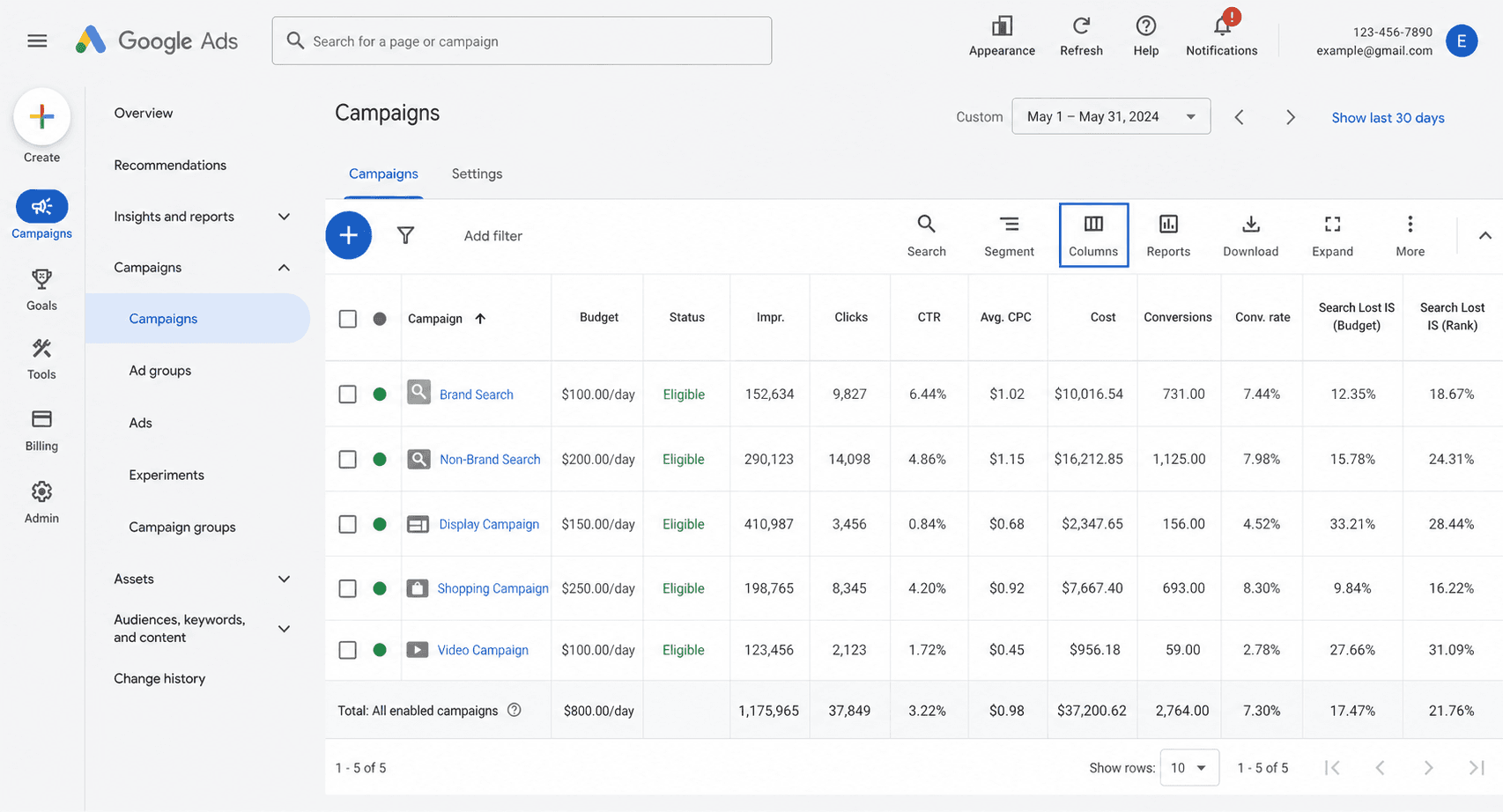
To enable the diagnostic columns, click the Columns icon above your keyword table, then add Search Impr. Share, Lost IS Budget, and Lost IS Rank. Once visible, the signals are easy to read. Lost IS Budget above 30 percent in the campaign table means budget is the bottleneck. A Limited by Budget status on the campaign confirms it. A daily budget set under 5x your target cost per click is almost never enough to compete in 2026. And splitting one small budget across multiple campaigns gives each one too little to win consistently. Consolidating a small budget into one focused campaign almost always produces better results than spreading it thin. Our guide on small business ad budget covers the minimum spend needed for Google Ads to generate meaningful data.
Reason 3: Keywords have low or zero search volume
If you are targeting very specific long-tail phrases or niche industry terms, Google may automatically pause them with a Low search volume status. These keywords stay inactive until search demand increases, which for very niche terms may never happen at all.
To check, go to Keywords inside your campaign and scan the status column next to each keyword. Any keyword with the status Low search volume is paused by Google and will not generate impressions. Use Google Keyword Planner to find keywords with at least 100 monthly searches, and switch from Exact Match to Phrase Match or Broad Match to capture more search variations around the same intent. A keyword that earns one impression a week is functionally invisible — broader matching usually captures the same intent through higher-volume variants.
Reason 4: Your Quality Score is limiting auction entry
A low Quality Score means Google has less confidence that your ad provides a good experience. The algorithm restricts how often low-quality ads enter auctions and charges significantly more per click when they do. In 2026, a Quality Score of 1 costs up to 400 percent more per click than a score of 5, which means low scores both reduce impressions and inflate cost on the impressions you do win.
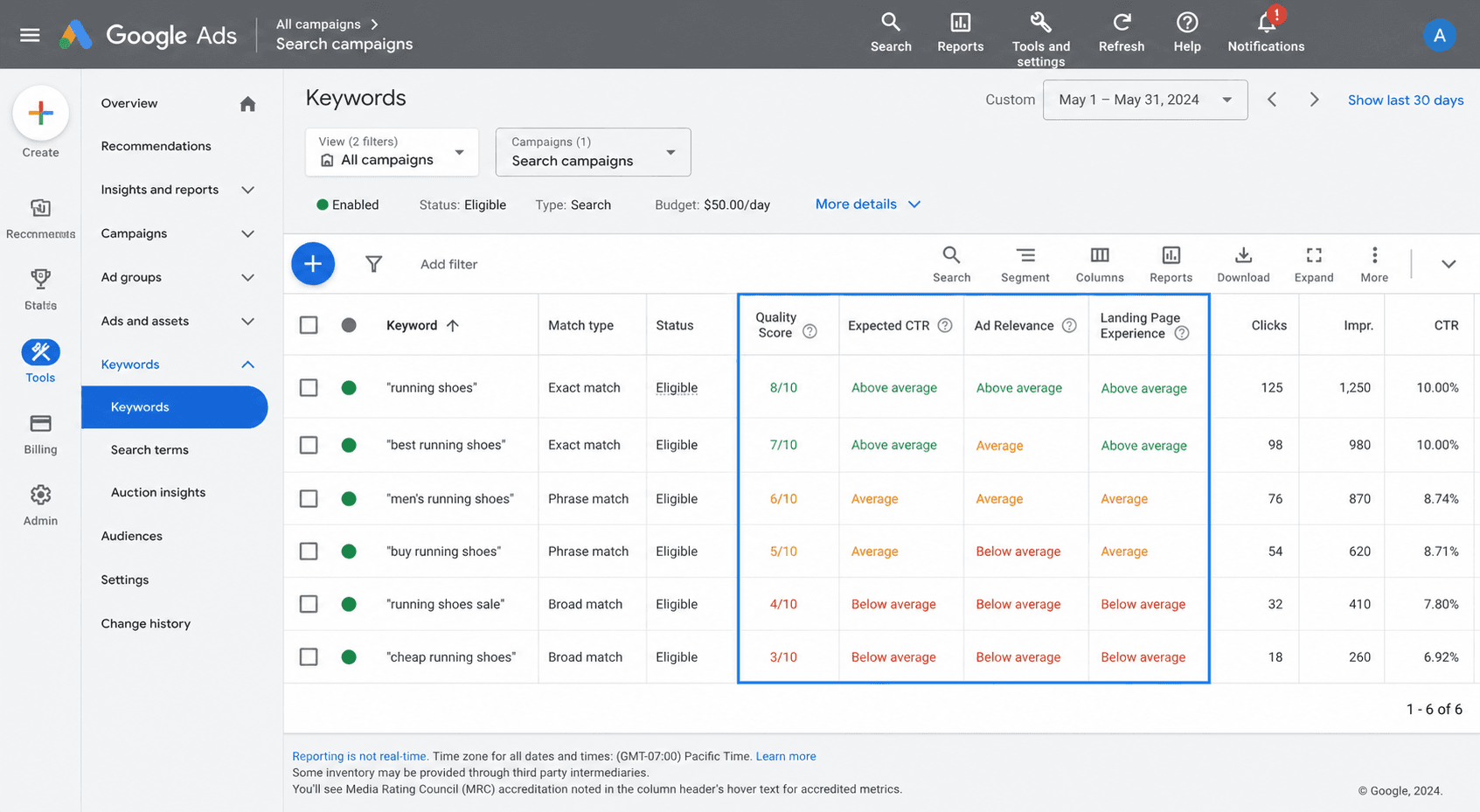
There are three Quality Score components to check separately. Expected CTR improves when you put the keyword in Headline 1 and use a specific offer rather than a generic claim. Ad Relevance improves when you break large ad groups into small themed groups of three to five keywords each. Landing Page Experience improves when you create campaign-specific landing pages rather than sending all paid traffic to your homepage. We covered the full Quality Score fix process in our dedicated guide on Google Ads Quality Score. If your scores are below 5, fixing Quality Score is the single highest-value improvement available — both impression volume and CPC respond to it directly.
Reason 5: Your targeting settings are too narrow
Each targeting restriction narrows the pool of eligible searches. A small geographic radius plus a narrow ad schedule plus stacked audience layers can result in a pool so small that there are almost no eligible auctions to enter. This is increasingly common in 2026 as advertisers over-optimise new campaigns before they have data to optimise against.
Common targeting settings that cause Google Ads not getting impressions include a location radius set to less than five kilometres around a single point, an ad schedule restricted to only two or three hours per day or specific days, multiple audience layers set to Targeting mode instead of Observation mode, device targeting that removes mobile (which now accounts for 62 percent of Google searches in 2026), and language targeting that excludes a significant portion of your actual audience. The fix in all cases is the same: start broad, then narrow based on data after the campaign has run for at least two weeks.
Reason 6: Negative keywords are accidentally blocking your ads
Negative keywords are designed to prevent irrelevant searches. But when set too broadly, or when the same term appears as both a positive and a negative keyword at different match types, they can block the exact searches you want to appear for. This is especially common in accounts that have been running for a while and have accumulated negative keyword lists over time.
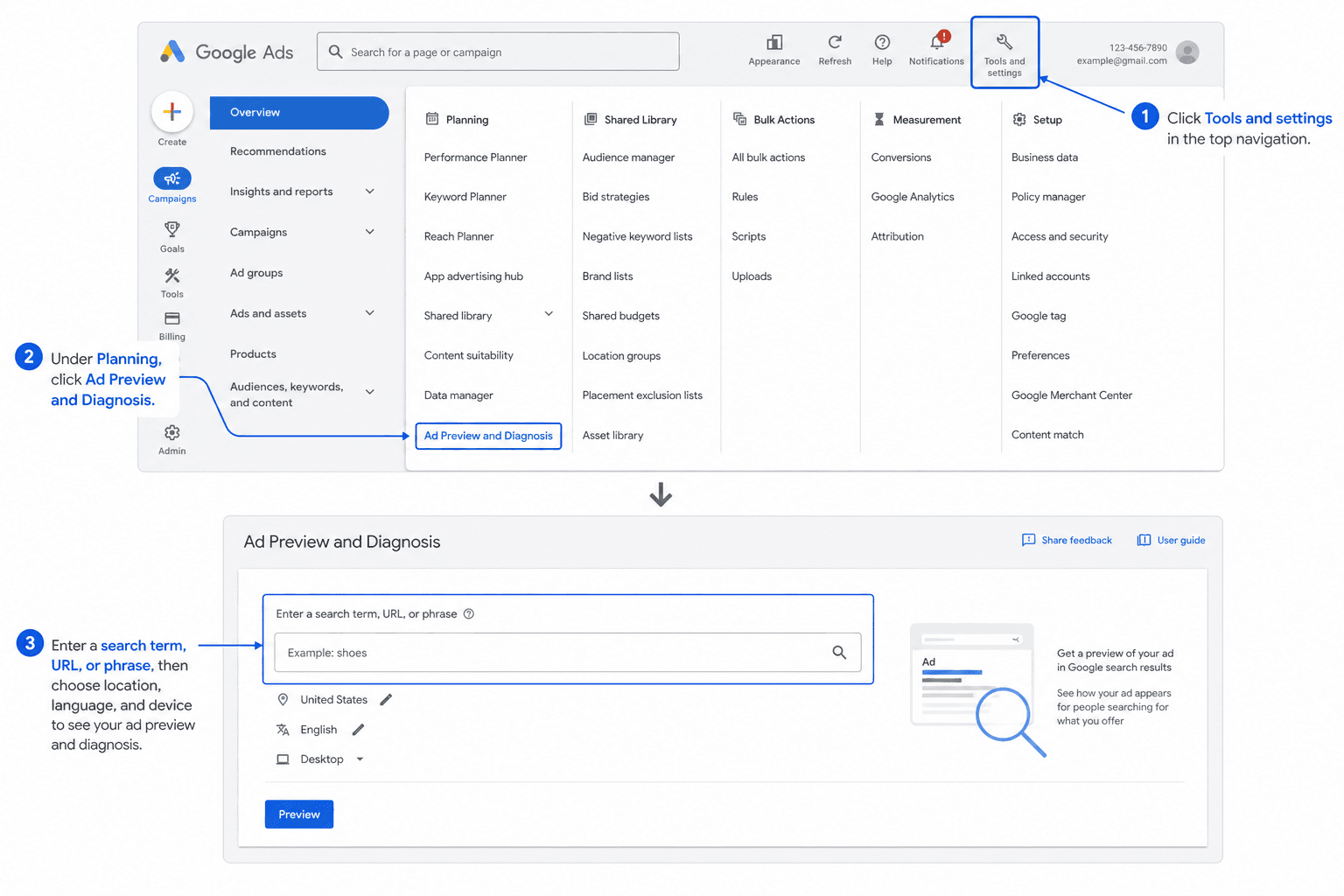
Before changing anything, use the Ad Preview and Diagnosis Tool to confirm whether a specific search is being blocked. Go to Tools and Settings in the top menu, then Planning, then Ad Preview and Diagnosis. Enter the keyword you want to test, select the location and language, and the tool shows whether your ad is eligible and, if not, the exact reason.
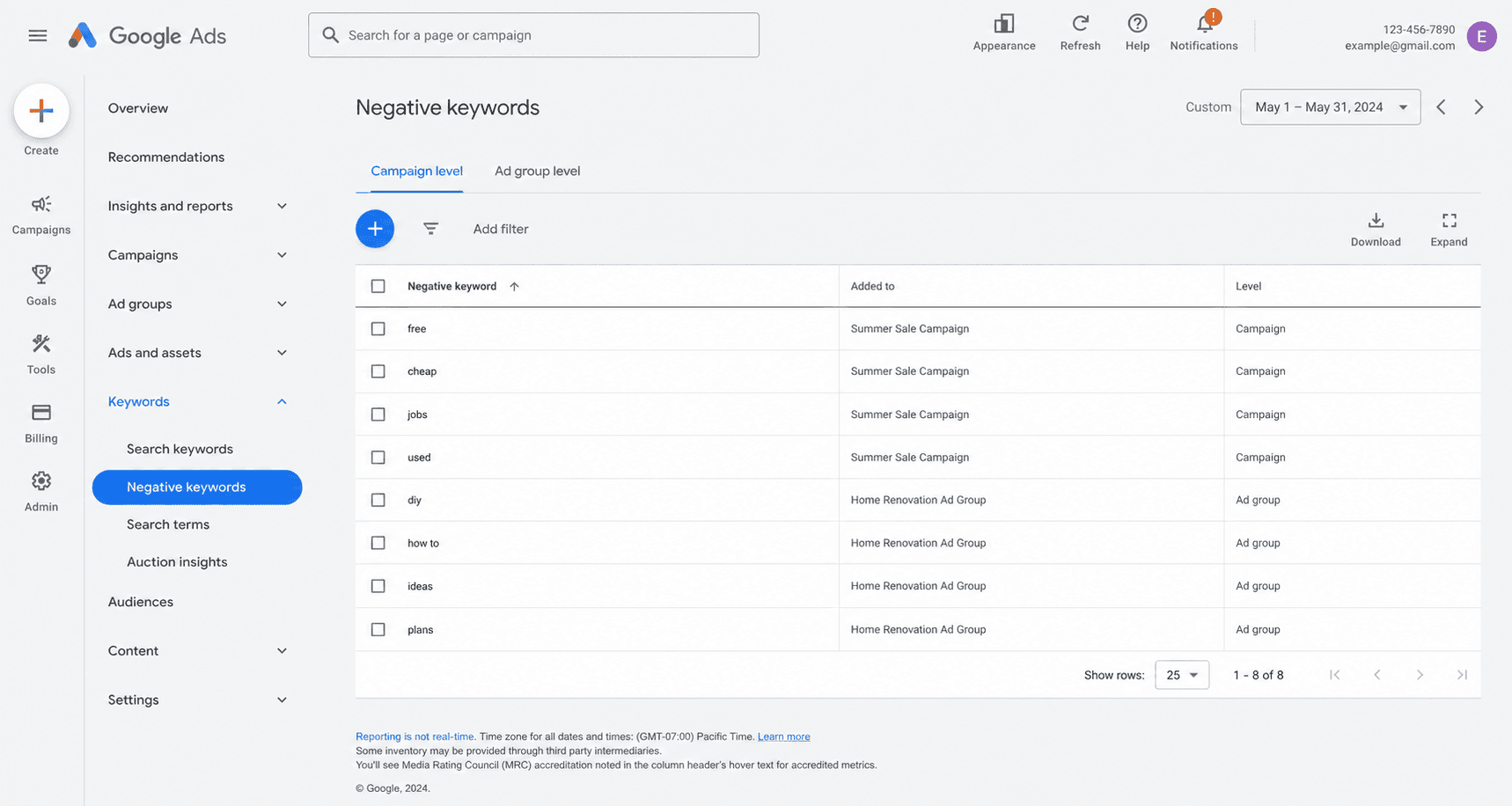
Then go to Keywords, then Negative Keywords inside your campaign, and check the negative keyword lists at both campaign level and ad group level. Check any shared negative keyword lists you use across campaigns, and look for terms that overlap with your positive keywords. A surprising number of impression issues are resolved by removing one over-broad negative keyword added months ago.
Reason 7: A billing or payment issue has paused your account
Billing failures pause every campaign simultaneously regardless of how well each one is configured. If Google Ads were running fine and then suddenly stopped getting impressions across all campaigns at the same time, check billing first before anything else — campaign-level fixes will not move the needle when the block is one layer above the campaign.
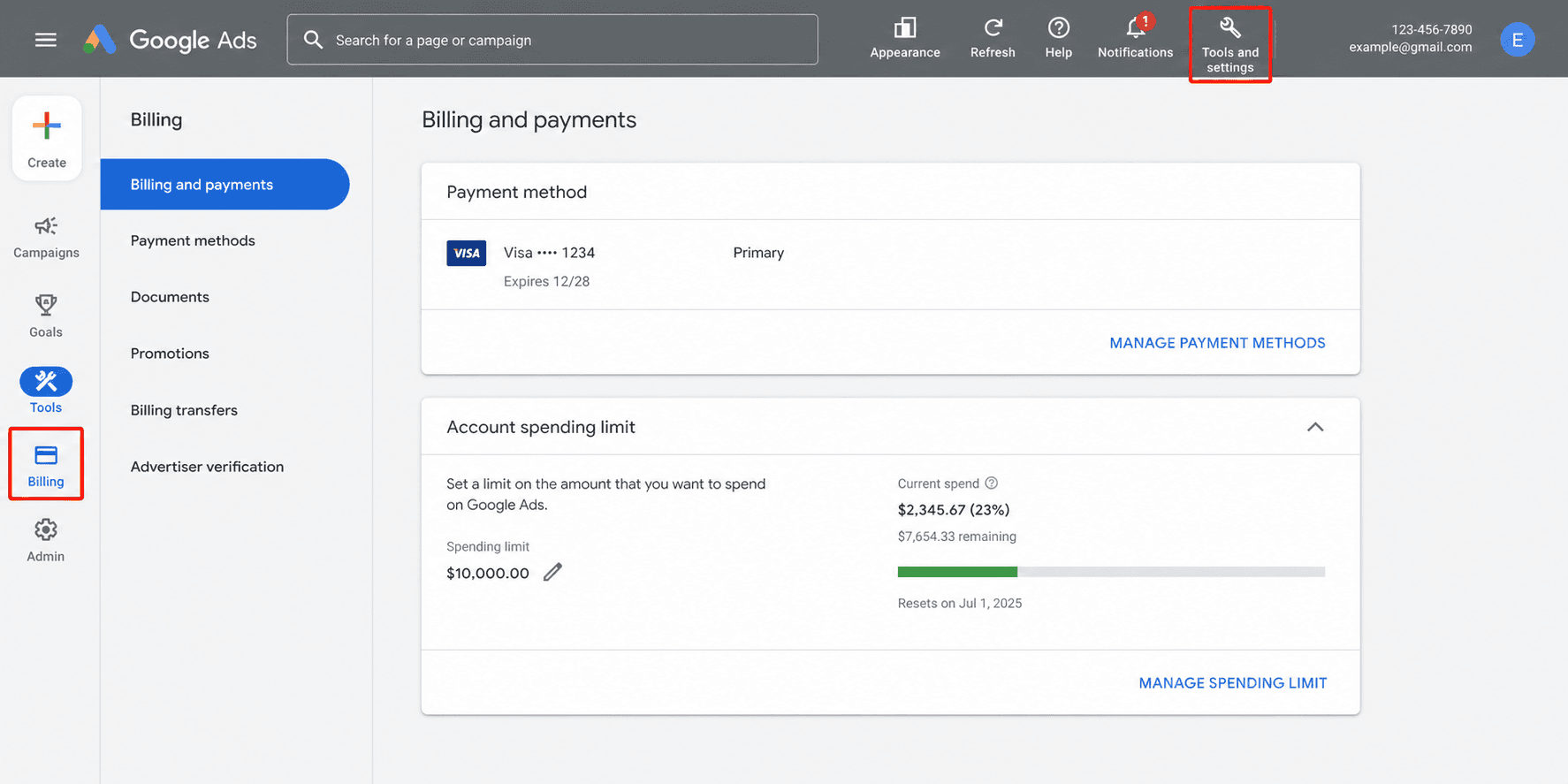
Go to Tools and Settings, then Billing and Payments. Confirm your primary payment method is active and not expired. Look for failed payment notifications or outstanding balance warnings at the top. Check your Account Spending Limit — if it has been reached, click Reset or raise the limit. Add a backup payment method to prevent future interruptions if your primary card fails or expires unexpectedly.
2026-specific reasons your Google Ads are not getting impressions
These four causes are specific to 2026 and are not covered in most older guides. They account for an increasing share of impression problems as Google pushes more advertisers toward AI-powered bidding and Performance Max.
Reason 8: tCPA or tROAS set too aggressively for current performance
This is the most common cause of zero impressions in 2026 that most guides miss entirely. When you set a Target CPA or Target ROAS significantly lower than your actual historical performance, Google's algorithm determines it cannot hit that target and simply stops bidding into auctions. Your campaign shows Active. Your ads are approved. But nothing spends, because the algorithm is waiting for an auction it believes it can win at your target price — and that auction does not exist at your number.
The fix is to loosen the target enough for the algorithm to find auctions it can win. Pull your historical average CPA or ROAS from the last 90 days of campaign data. Set tCPA at 2x to 3x your actual historical CPA to start. Set tROAS at 20 to 30 percent below your actual historical ROAS to start. If the campaign is brand new with no conversion history, switch to Maximize Conversions with no target at all for the first 30 days. Only add a tCPA or tROAS target after the campaign has generated at least 50 conversions, which is the minimum data set the algorithm needs to bid confidently toward a specific number.
Reason 9: Ad disapproved silently after initial approval
In 2026, Google's review system sometimes flags ads gradually over three to four days after initial approval. The ad starts spending, then quietly stops. The status column may still show Eligible for some time before updating to Disapproved or Limited. If your Google Ads were getting impressions and then stopped without any campaign changes on your side, check Account Quality before anything else.
To check, click the grid icon in the top right of Google Ads, then click Account Quality. Look for any policy warnings, restrictions, or disapproval notices on the account. Then check your landing page for recent changes that might have triggered a new policy review — even small layout changes can flag the page for re-review. Confirm your destination URL is not returning a 404 or an unexpected redirect, because broken landing pages now trigger silent disapprovals far more often than they used to.
Reason 10: Performance Max campaigns blocking Search campaign impressions
Performance Max campaigns in 2026 can compete directly with your own Search campaigns for the same searches, causing Search campaigns to lose impression share. If you are running both PMax and Search campaigns targeting similar keywords, your Search campaigns may show very low or zero impressions because PMax is winning the internal auction inside your own account.
To fix the conflict, add Search Themes to your PMax Asset Groups so PMax has clear intent signals to focus on rather than competing for everything. Use Campaign-level negative keywords inside PMax to prevent it from targeting your core Search keywords. Check the Insights tab in PMax to see which search terms it is actually capturing — if it is consuming your branded or money-keyword searches, that is exactly the impression share your Search campaign just lost. If your Search campaign impressions dropped immediately after launching PMax, this is almost certainly the cause, and a brief pause of PMax will confirm it within 24 hours.
Reason 11: Ad schedule timezone error
A surprisingly common cause of Google Ads not getting impressions is an ad schedule configured in the wrong timezone. If your Google Ads account timezone does not match your target market timezone, your ad schedule may be set to run during hours when nobody in your market is searching. The campaign appears active but is eligible for zero searches during the hours it is actually scheduled to run.
Go to Campaign Settings, then Ad Schedule, and check the timezone displayed next to your schedule settings. Then go to Account Settings and confirm your account timezone matches your target market. If they do not match, update either the ad schedule or the account timezone — note that account timezone cannot be changed after the account is created in most cases, so the ad schedule is usually the side that needs adjusting.
Reason 12: Date range error in the dashboard
The simplest and most overlooked cause. Before troubleshooting any settings, confirm you are viewing the correct date range. If your campaign launched yesterday and you are viewing a date range that starts last month, the campaign will show zero impressions for the earlier period even if it is running perfectly today.
Click the date range selector in the top right of your Google Ads dashboard and set it to a period that starts from your campaign launch date. Then check the Campaign Status column to confirm the campaign was actually active during that period. This sounds trivial, but it is genuinely the cause of around five percent of "my ads are not getting impressions" support tickets — always rule it out first before changing settings.
Google Ads approved but no impressions: what to check
If your ads show Eligible or Approved status but are still not getting impressions, the review process is not the issue. The campaign is cleared to run but not winning auctions. This is almost always caused by one of four things: budget too low to win auctions at current CPM rates (check the Lost IS Budget column), tCPA or tROAS target set too aggressively (switch to Maximize Conversions temporarily), Quality Score too low to enter auctions competitively (check the keyword-level Quality Score columns), or targeting so narrow that there are almost no eligible searches (broaden location, schedule, and audience settings). Use the Ad Preview and Diagnosis Tool to test whether your ad is eligible for specific searches before changing anything else.
How long does it take for Google Ads to get impressions after launch?
Most campaigns start getting impressions within 24 to 48 hours of launching. This is the standard review time for new ads. After approval, impression volume typically builds over the first one to two weeks as the algorithm learns which searches to enter your ads into.
If your Google Ads are not getting impressions after 48 hours and the ads show Eligible status, the issue is almost always budget or keyword search volume. Work through the 12-reason checklist above starting from Reason 2. For Smart Bidding campaigns with a tCPA or tROAS target, the first two weeks are particularly sensitive — the algorithm is in a learning phase and needs conversion data before it can bid confidently. Keeping budgets stable and targets loose during the first 30 days significantly reduces the chance of zero-impression periods caused by over-aggressive targets.
Once your ads are getting impressions and generating clicks, the next question is whether those impressions are turning into results. Our guide on why your ads are not converting on Meta and Google covers what happens after the impression and why a well-configured campaign can still fail to produce customers if the post-click experience does not deliver. And once you have impressions, clicks, and conversions flowing through cleanly, the weekly review process in our guide on ad analytics is what keeps the campaign improving rather than drifting. If you are running everything solo and this whole loop is starting to feel like a second job, how to manage ads without an agency covers how to keep the time commitment under an hour a week.
---
Frequently Asked Questions
Q: Why are my Google Ads not getting impressions?
Google Ads not getting impressions is almost always caused by one of 12 issues. The most common in 2026 are bid strategy targets set too aggressively for current account performance, a budget too low to win auctions, a Quality Score below competitive threshold, and targeting settings that are too narrow. Check the Lost IS Budget and Lost IS Rank columns in your campaign table first — these two metrics tell you immediately whether impressions are being lost to budget constraints or to ad quality issues.
Q: Why are my Google Ads approved but not getting impressions?
Google Ads approved but not getting impressions means the review process is not the issue. The campaign is cleared to run but not winning auctions. The most common causes are a tCPA or tROAS target set too aggressively, a budget too low to compete at current CPM rates, a Quality Score too low to enter auctions competitively, or targeting settings too narrow to find enough eligible searches. Use the Ad Preview and Diagnosis Tool to confirm whether your ad is eligible for specific search queries before changing anything else.
Q: How long does it take for Google Ads to start getting impressions?
Most Google Ads start getting impressions within 24 to 48 hours of launching, after passing the review process. New accounts may take slightly longer due to account-level spending limits that gradually increase. After approval, impression volume typically builds over the first one to two weeks as the algorithm learns. If your ads are approved and showing Eligible status but generating zero impressions after 48 hours, check your budget relative to target CPC and your keyword search volume before changing anything else.
Q: Why did my Google Ads impressions suddenly drop?
Google Ads impressions dropping suddenly is caused by one of four things in 73 percent of cases according to 2026 research: bid strategy changes including tCPA or tROAS targets becoming too aggressive, competitor activity increasing auction pressure, Quality Score degradation, or account spending limits being reached. Check your Lost IS Budget and Lost IS Rank columns to identify which category the drop falls into. If Lost IS Rank increased significantly, the issue is ad quality or bidding. If Lost IS Budget increased, the issue is spend.
Q: Why are my Performance Max ads not getting impressions?
Performance Max not getting impressions in 2026 is commonly caused by thin Asset Groups with too few creative assets, no Search Themes added to guide where PMax focuses, tROAS targets set too aggressively, or PMax competing with and losing to your own Search campaigns. Add at least five text assets, five image assets, and one video asset per Asset Group. Add specific Search Themes to tell the algorithm what intent to target. If you recently launched PMax alongside Search campaigns, check whether your Search campaign impression share dropped at the same time — that is the most common signal of an internal-account conflict.
Q: What is the Ad Preview and Diagnosis Tool and how do I use it?
The Ad Preview and Diagnosis Tool is a free tool inside Google Ads that shows you whether your ad is eligible to appear for a specific search without affecting your campaign data. Go to Tools and Settings in the top menu, then Planning, then Ad Preview and Diagnosis. Enter the keyword you want to test, select the location and language, and the tool shows whether your ad would appear and, if not, exactly why. This is the correct way to test whether your ads are showing without hurting your CTR signals by searching for your own ads on Google directly.
Ready to simplify your ads?
Create, deploy, and track across every platform in one place.
Get started free